Getting started
Create a signature without an account
In short
Open the editor with the Create my signature button: fill in your details, pick a template and see the result live, with no account. A free account is only asked for when you want to copy, download or save the signature.
Checked on 19 November 2026
- Click Create my signature at the top of any page of the site.
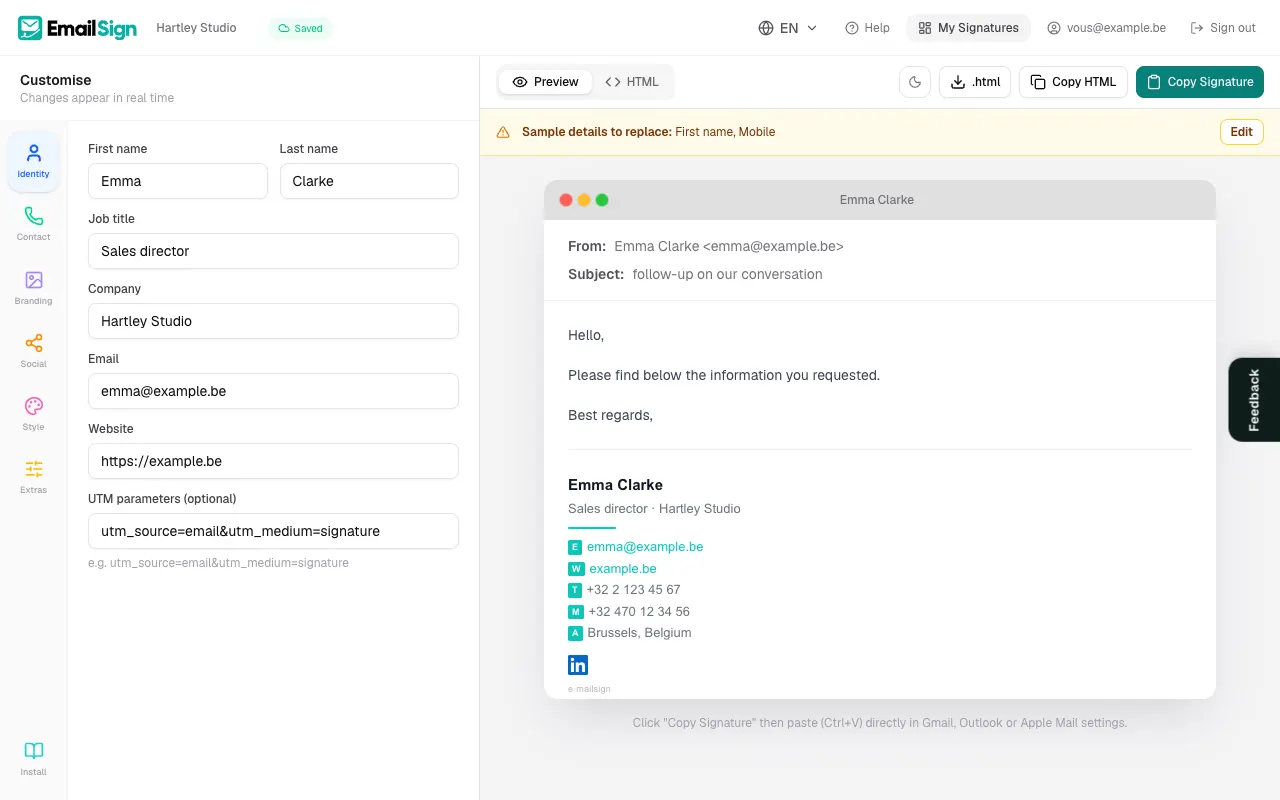
- In Identity, replace the sample details with your first name, last name, job title, company, email and website.
- In Contact, add your phone, mobile and address.
- In Style, pick one of the 16 templates and your accent colour.
- Look at the preview on the right (on a phone: the Preview tab). Every change shows straight away.
- When you like the signature, click Save my signature: a free account is created in one click and your work is copied into it.
What needs an account
- Copying the signature, copying the HTML code or downloading the .html file.
- Uploading a logo, photo or banner from your computer. Without an account, you can paste the link of an image that is already online.
- Keeping the signature to edit it later, creating several, turning on click tracking.
Your draft stays in your browser while you sign in: nothing is lost. The account is free, with no password and no credit card. See Create an account.
Starting from a template seen in the template gallery? The Use this template button opens the editor with that template already selected.
Frequently asked questions
Is it really free?
Yes, forever, with every template and as many signatures as you like. The free version adds a small "e·mailsign" link under the signature, which Pro removes.
Is my information sent anywhere before I create an account?
No. Until you have an account, the draft stays in your browser. It is saved on our servers only when you click Save my signature and sign in.
Was this article helpful?
Read next
Did not find your answer?
Email us, in English, French or Dutch. Andy, the founder, answers himself.